Electronic Projects, forums and more.

Go Back   Electronic Circuits Projects Diagrams Free > Electronics Categories > Micro Controllers


Micro Controllers Discuss all aspects of micro controllers - building them, coding them, etc. All controllers are welcome - PIC, BASIC, Z8 Encore!, etc.

Reply
 
Tools
Old 24th June 2008, 07:26 AM   #16
Default

Pommie:

Any luck in the serial LCD Driver?


Quote:
Originally Posted by Pommie View Post
Mike,

It was my first time using the C18 compiler and so the code is not very well written. I have since written a serial LCD driver that allows me to do things like this.

I'm probably going to make the code and circuit available on the web when I get it finished.

Mike.
bryan is online now  
Old 24th June 2008, 09:57 AM   #17
Default

Yes, it's all done, I just haven't got around to debugging and documenting it. Maybe it's something I should try and get completed in the next couple of weeks.

I've even done a PCB, two actually, one with ICD and 9 Pin D connector and a more compact one with an SMD EEPROM.

These are the boards and I need to make a decision and get one of them made.


Anyone have any pros/cons between the two boards?
Some relevant info,
The serial can be connected through the D connector or the 4 pin header.
The serial auto switches polarity so it can connect to a PC or a Pic chip without a Max232 chip.
The crystal, keyboard components and serial EEPROM are optional and can be omitted.
Both boards fit comfortably behind the main GLCD display board.

All comments welcome.

Mike.

Last edited by Pommie; 6th July 2008 at 05:13 PM.
Pommie is offline  
Old 24th June 2008, 01:03 PM   #18
Default

Both are extremely nice Mike. I don't think I would put that big DB-9 connector on the board but that's just a personal preference.

Mike

Last edited by Mike, K8LH; 24th June 2008 at 01:03 PM.
Mike, K8LH is offline  
Old 27th December 2008, 08:11 PM   #19
Default

Hi Pommie:

Experimenting with you KS0108 GLCD code with limited success. I can properly simulate you example on Proteus and works like a charm. But when hardwired it fails and I can not get anything to display. Using ICSP and programming the PIC I will get some semblence of the display to work, but when the project is powered off/on nothing is displayed. I suspect the KS0108 is not initializing properly. Have experimented with adding various delays etc, but still no luck. The GLCD is fine as I have experimented displaying using other project code with success, just can not get you example to work. Any suggestions??
Attached Thumbnails
Unicorn GLCD demo.-glcd.jpg  
bryan is online now  
Old 28th December 2008, 01:33 AM   #20
Default

Hi bryan,

The only thing that would stop it working is if the defines in LCD.h were wrong or you don't have a crystal. I'm assuming you are using the code from this thread. If you have earlier code then you need to change Init_GLCD in GLCD.c. You should also try switching to the internal oscillator - see page two of above thread.

Mike.
Pommie is offline  
Old 28th December 2008, 09:58 AM   #21
Default

Hi Pommie:

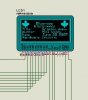
Pretty much played with everything, changing oscillators, using internal vs external. Attached is a pic of your project running on Proteus with the defines changed to make it compatible with the EP4 development board. As you can see it works fine on Proteus but just won't work on a breadboard or the EP4.

Second pic is what is displayed when the pic is first programmed, as you can see there is problems in the display. Turning off/on the board's power and then nothing will display.

I know the display is fine because I can get it to work on a breadboard or EP4 with Richard.C assembler code for the KS0108

Have tried debugging with my PK2 and still can not get anything to display, or see where the problem is. Perhaps I am missing a config setting by using the 18f4520 instead of 18f4550.

My define's

#include <p18f4520.h>

#define GLCD_Data PORTD
#define b_GLCD_GCS1 LATBbits.LATB1
#define b_GLCD_GCS2 LATBbits.LATB0
#define b_GLCD_RS LATBbits.LATB2
#define b_GLCD_RW LATBbits.LATB3
#define b_GLCD_E LATBbits.LATB4
#define b_GLCD_ON LATBbits.LATB5
#define b_GLCD_BL LATBbits.LATB6

#define TRIS_Data TRISD
#define b_TRIS_GCS1 TRISBbits.TRISB1 //GCS1
#define b_TRIS_GCS2 TRISBbits.TRISB0 //GCS2
#define b_TRIS_RS TRISBbits.TRISB2 //RS
#define b_TRIS_RW TRISBbits.TRISB3 //RW
#define b_TRIS_E TRISBbits.TRISB4 //E
#define b_TRIS_ON TRISBbits.TRISB5 //RST
#define b_TRIS_BL TRISBbits.TRISB6 //backlight
Attached Thumbnails
Unicorn GLCD demo.-pommie_glcd_ep4.jpg   Unicorn GLCD demo.-picture.jpg  
bryan is online now  
Old 28th December 2008, 11:41 AM   #22
Default

That picture looks like it is a timing problem. My guess is that you are running at a much higher clock rate than I was. Try repeating the asm line in delay.

I.E.
Code:
void Delay(void){
	_asm	NOP	_endasm
	_asm	NOP	_endasm
	_asm	NOP	_endasm
	_asm	NOP	_endasm
}
Mike.
Pommie is offline  
Old 28th December 2008, 09:24 PM   #23
Default

Quote:
Originally Posted by blueroomelectronics View Post
It looks fantastic Mike. Well done and the leaf looks great.

Did you try the scope software I attached to an earlier thread.
Bill,

I would like to try the Scope software, but can't seem to find the post. Could you please point me to it?

Thanks,
Paul
pwssr is offline  
Old 29th December 2008, 11:57 PM   #24
Default

am I just a retard or is the glcd.zip attachment no longer available for download?
notjohndavid is offline  
Old 30th December 2008, 12:44 AM   #25
Default

I'll see if I can locate it on my site.
__________________
Bill
Smart Kits build Smart People

http://www.blueroomelectronics.com/
blueroomelectronics is offline  
Old 30th December 2008, 12:59 AM   #26
Default

greatly appreciated!
notjohndavid is offline  
Old 30th December 2008, 01:30 AM   #27
Default

I've found this pair in my archives. Not sure if they're the latest though.
Attached Files
File Type: c 18F452 GLCD Oscilloscope DR1r1 - no bootloader.c (11.0 KB, 88 views)
File Type: c GLCD - modified.c (9.8 KB, 106 views)
__________________
Bill
Smart Kits build Smart People

http://www.blueroomelectronics.com/
blueroomelectronics is offline  
Old 30th December 2008, 02:35 AM   #28
Default

Here you go.

Mike.
Attached Files
File Type: zip GLCD.zip (31.6 KB, 235 views)
Pommie is offline  
Old 30th December 2008, 02:42 AM   #29
Default

ahh.. thanks guys This gives me something to waste time^H^H^H^H^H^H^H^H^H^Hplay with tonight
notjohndavid is offline  
Old 16th January 2009, 02:17 PM   #30
Default

Hey i know this thread is kinda old just wanted to say thanks for the code and i modded it slighty to fit a PIC18F448 @ 20 Mhz and here is the code if anyone needs it. (doesnt show that logo and stuff tho.)

I aslo found it does say you need to read the data twice ...
Quote:
Yes, I tried the oscilloscope and it looks good.

One thing I forgot to mention earlier which may cause people problems is that the data sheet you link to (topway) doesn't mention the fact that, when reading from the display data, you need to do a dummy read before you get valid data. If you look at the plot routine you'll see what I mean. Don't you just hate it when data sheets are wrong.

Mike.
Im not sure if it was meant for that but i would have assumed it was.

Here is my code(your code) , my image and my finding in the datasheet.
Attached Thumbnails
Unicorn GLCD demo.-glcd.png   Unicorn GLCD demo.-twice.png  
Attached Files
File Type: zip GLCDAS.zip (67.7 KB, 123 views)
AtomSoft is offline  
Reply

Tags
demo, glcd, unicorn

Thread Tools
Display Modes


Similar
Title Starter Forum Replies Latest
Unicorn Oscilloscope running GLCD 128x64 & Photo blueroomelectronics Micro Controllers 8 18th June 2007 03:06 PM
Help understanding the Unicorn Kyle-s4h Micro Controllers 2 5th June 2007 07:09 PM
Open MultiSim DEMO Files mayo General Electronics Chat 1 3rd May 2007 04:52 PM
mcuStudio an Eclipse based IDE for PIC: flash demo available octal Micro Controllers 0 23rd August 2006 06:44 AM
Honeywell HMR3000 DEMO KIT shermaine General Electronics Chat 5 26th May 2005 09:35 AM


All times are GMT. The time now is 09:14 PM.


Electronic Circuits  |  Learning Electronics
eXTReMe Tracker